Your budget, your inputs
Budget without connecting your bank account
InfinitelyZero lets you build and manage your budget without requiring a bank connection. Enter your accounts, balances, transactions, bills, and spending intentionally—with Local and Cloud options available.
Bank connection is not required. Choose what enters your budget and review it deliberately.
A workflow choice
Bank connection should be a choice, not a requirement
Some people prefer direct control over what enters a budget, deliberate transaction review, or a workflow that does not depend on an automatic bank feed. Others value connected automation. InfinitelyZero's current budgeting workflow can be used without requiring the connection.
Build from information you control
How InfinitelyZero works without bank syncing
Start with your real balances and maintain the plan through direct entry, reviewed files, and optional tools that add useful context.
Accounts and starting balances
Create the accounts you want represented and enter the balances that establish your budget's starting point.
Transactions and reviewed imports
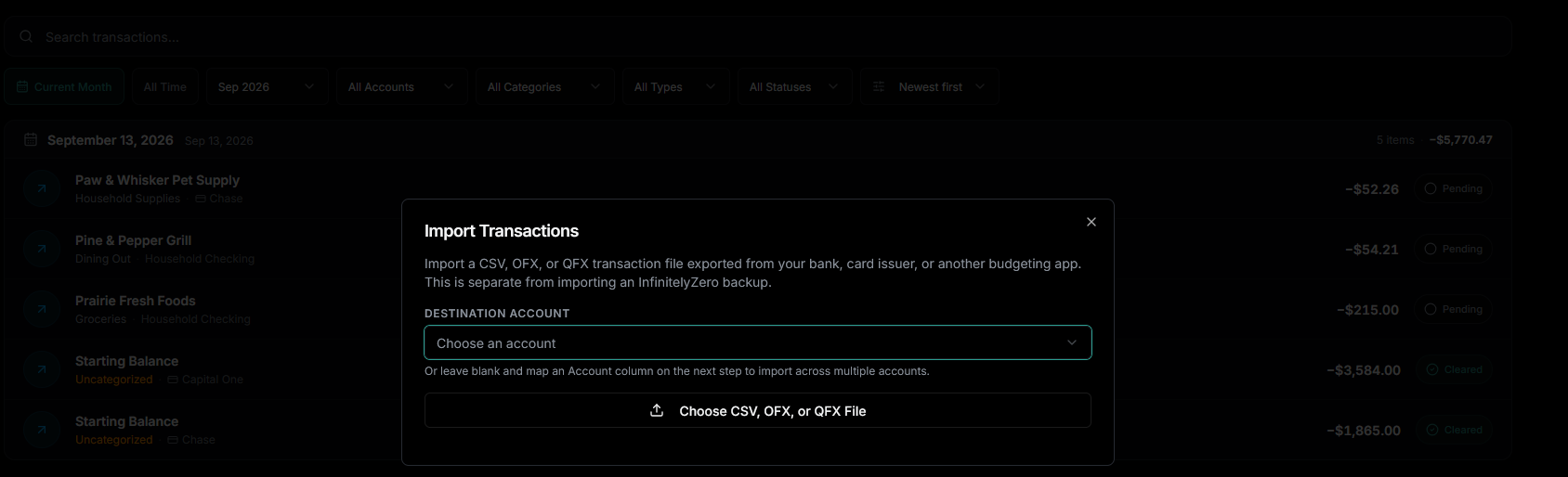
Record transactions yourself or import supported CSV, OFX, and QFX files, reviewing the result before it is applied.
Income, bills, and everyday spending
Plan expected paychecks, bill timing, and flexible spending using information you intentionally maintain.
Paycheck and Cash Flow planning
See upcoming activity, paycheck windows, and projected account cash based on the plan currently in InfinitelyZero.
Optional receipt detail
Scan receipts when useful, review the transaction and line items, and decide what information should be applied.
Price Book and Shopping tools
Keep selected personal price observations and reuse saved products in Shopping Lists where supported.
Plan timing in the Budget by Paycheck view, or see how reviewed scans add context on the Receipt Scanner Budget App page.
Practical answers
What changes when there is no live bank feed?
You replace automatic feed maintenance with deliberate entry, reviewed file imports, and reconciliation. You avoid connection consent, broken-feed, and relink steps, while taking responsibility for keeping the ledger current.
What if I don't want to connect my bank?
You do not have to authorize Plaid or another bank-connection service. Create only the accounts you want represented, enter each starting balance once, and maintain the ledger intentionally.
Can I still reconcile accounts?
Yes. Mark activity pending or cleared, compare the cleared balance with the statement, and finish reconciliation inside the account workflow.
Can I import transactions instead?
Yes. Import a CSV, OFX, or QFX export from your bank or card issuer, map it to an account, review errors and possible duplicates, and choose which rows to apply.
Where is my data stored?
That depends on the storage mode you choose, not on bank connectivity. Local keeps the budget in that browser profile or native installation; Cloud uses InfinitelyZero's hosted service for supported signed-in access.
Storage modes
Choose how you want to use InfinitelyZero
Local and Cloud describe where the budget is stored. Neither one requires a bank connection.
Local
Keep each budget's financial state in on-device application storage for that browser profile or supported native installation. Local environments remain independent, do not automatically sync, and do not become Cloud copies merely because you sign in. Optional online tools may still send the limited information needed for their task.
Cloud
Store the budget through InfinitelyZero's hosted service after signing in. Sync between devices is coming later; Cloud storage does not connect InfinitelyZero to your bank.
Compare the storage choices on the Local Budgeting App page, or review device boundaries, backups, and access requirements in Local and Cloud.
Deliberate inputs
You decide what goes into your budget
Enter or review the balances, transactions, bills, expected income, everyday spending, receipts, and Price Book observations that InfinitelyZero uses. IZ Assist gives you quick shortcuts for funding, transactions, bills, and plan items. You review every change before it's saved. Your balances and forecasts remain authoritative.
Enter
Add accounts, balances, bills, income, and transactions.
Review
Inspect imported files and receipt proposals before applying.
Plan
Use budget, paycheck, and Cash Flow views with current inputs.
Adjust
Correct activity and revise the plan as real life changes.
A fair comparison
Manual budgeting and connected budgeting solve different needs
Features vary by product. This comparison describes InfinitelyZero's available no-connection workflow alongside a typical connection-centered approach—not a claim that one method is best for everyone.
Bank connection required
- InfinitelyZero without a connection
- No
- Connection-centered approach
- Often central to the workflow
Automatic transaction import
- InfinitelyZero without a connection
- Use reviewed file imports instead
- Connection-centered approach
- Often provided through the connection
Manual transaction control
- InfinitelyZero without a connection
- Built into the workflow
- Connection-centered approach
- Varies by product
Works without sharing bank credentials with a connection service
- InfinitelyZero without a connection
- Yes
- Connection-centered approach
- Depends on the connection method
Receipt-level purchase information
- InfinitelyZero without a connection
- Optional reviewed receipt workflow
- Connection-centered approach
- Varies by product
Local-use option
- InfinitelyZero without a connection
- Available
- Connection-centered approach
- Varies by product
Helpful answers
Budgeting without a bank connection FAQ
Can I use InfinitelyZero without connecting my bank?
Yes. Bank connection is not required. You can create accounts, enter balances and transactions, plan bills and income, and use the budgeting tools without linking a bank account.
Can I enter transactions manually?
Yes. You can record transactions directly and review the account, payee, category, date, and amount. Supported CSV, OFX, and QFX file imports are also available when you prefer a reviewed batch workflow.
Can I reconcile accounts without bank sync?
Yes. Maintain pending, cleared, and reconciled transaction status, compare the cleared balance with your statement balance, and complete the account reconciliation workflow without a live bank feed.
What is the difference between Local and Cloud?
Local and Cloud describe where InfinitelyZero stores your budget. Local keeps each budget's financial state in on-device application storage for that browser profile or supported native installation. Cloud stores the budget through InfinitelyZero's hosted service. Sync between devices is coming later. Neither mode is a bank connection.
Can I still use receipt scanning without linking my bank?
Yes. Receipt scanning is an optional, provider-backed extraction workflow that does not require a bank connection. Review the proposed transaction and receipt items before applying them.
For setup guidance, visit Accounts, Transactions, or the complete InfinitelyZero documentation.
Build your budget without linking your bank
Start with the accounts and numbers that matter, then maintain your plan through direct entry and reviewable workflows.